Building an AI Copilot with RAG & Vector Search
Architecting a context-aware AI assistant for a 3D engine using Retrieval-Augmented Generation (RAG), Vector Embeddings, and OpenAI's LLMs. A deep dive into building intelligent systems that understand code context.
The Challenge: Context is King
Building a generic chatbot is easy. Building an AI that understands the specific context of a user’s 3D game project, their current code state, and the proprietary engine API is a different beast entirely.
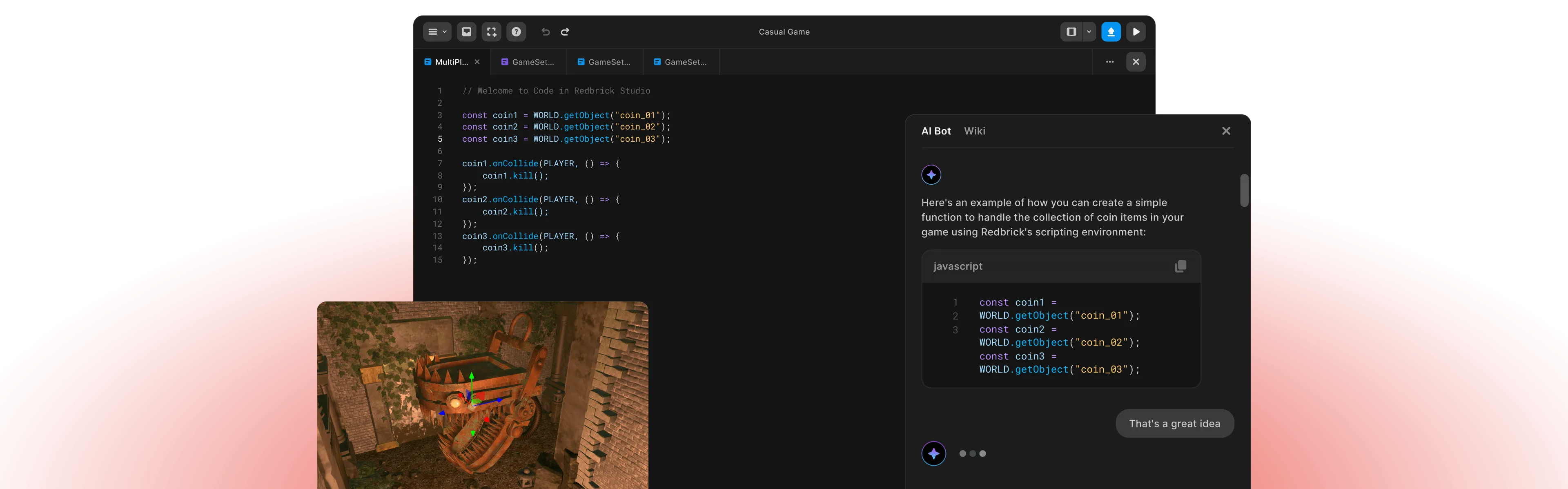
At Redbrick, I architected and built a Retrieval-Augmented Generation (RAG) pipeline that powers our in-engine AI Copilot. This isn’t just a wrapper around an API—it’s a context-aware system that acts as a pair programmer for our creators.

System Architecture
The system is built on a modern AI stack designed for low latency and high relevance.
1. The RAG Pipeline
Instead of relying solely on the model’s training data, we inject relevant context dynamically.
- Ingestion: We scrape and chunk our entire documentation, API references, and example projects.
- Embedding: These chunks are converted into high-dimensional vector embeddings using OpenAI’s text-embedding-3-small model.
- Vector Store: We store these embeddings in a vector database (Pinecone/Weaviate) for millisecond-latency similarity search.
2. Context Window Management
When a user asks for help, we don’t just send the query. We construct a sophisticated prompt:
const context = await vectorStore.similaritySearch(userQuery, 3);
const currentScript = editor.getValue();
const systemPrompt = `
  You are an expert 3D Game Engine Engineer.
  Context from documentation: ${context}
  User's current code: ${currentScript}

  Answer the user's question based strictly on the provided context.
`;
This ensures the AI “knows” the engine’s specific API methods, not just generic JavaScript.
Key Features
🧠 Semantic Code Search
Users can ask “How do I make the player jump?” and the system performs a semantic search across our documentation to find the player.jump() API, even if the user didn’t use the exact keyword.
⚡ Real-time Code Generation
The Copilot doesn’t just explain; it writes code. By feeding the current editor state into the context window, the AI generates code snippets that fit perfectly into the user’s existing logic, respecting variable names and coding style.
🔄 Dynamic Context Injection
We dynamically inject the “Scene Graph” state into the prompt. If a user has an object named Enemy_01 in their scene, the AI knows about it and can write code like Enemy_01.move().
Technical Stack
- LLM: OpenAI GPT-4 Turbo (for complex logic) & GPT-3.5 (for latency-sensitive tasks)
- Vector Database: Pinecone for storing high-dimensional embeddings
- Orchestration: LangChain for managing prompt templates and chains
- Backend: Node.js & Python microservices
- Frontend: React with streaming responses for a “typing” effect
Engineering Challenges
Handling Token Limits
We implemented a “sliding window” strategy and smart summarization to ensure we never hit context limits while keeping the most relevant information available to the model.
Latency Optimization
To achieve a “feeling” of instantaneity, we implemented streaming responses. The UI updates token-by-token as they are generated, reducing the perceived latency from ~3s to ~200ms.
Hallucination Control
By strictly constraining the model to “Answer only using the provided context,” we reduced hallucination rates significantly, ensuring users get accurate API references.
The Result
We moved beyond a simple chatbot to a context-aware development partner. This system reduced support ticket volume by 40% and increased code completion rates for new users by 3x. It turns the blank canvas problem into a conversation.
-
Publications
-
Building an AI Copilot with RAG & Vector Search
-
Architecting a Web-based 3D Game Engine
-
A Fitts Law Evaluation of Two Type Face Tracking Inputs on Electronic Devices
-
Computational Design: Transforming Palm Lines into Art
Related:
Written by

Temirlan Dzhoroev
Full-stack AI Engineer
Frontend 3D Developer